前言:
本文基于数学与大数据学院2024级数据科学与大数据技术专业课程《分布式数据库原理及技术》。该课程考核难度较大,需特别用心认真听课!我将个人笔记开源,旨在为后续的新同学提供复习参考,欢迎交流与讨论(虽然我也可能忘记了((
Chiale
2026.8.1
资料下载: https://pan.baidu.com/s/1k6hAS7tVlPAeOwbevS7b7A?pwd=t2uv 提取码: t2uv
第一篇 概论与基础
第一章 分布式数据库概述
1.1 前沿技术科普
以下技术作为通识了解即可,构成本课程的学习背景:
| 技术 | 理解 |
|---|---|
| 数据中台 | 把企业内分散的数据资产汇聚、加工、服务化,向业务统一供给 |
| 数据湖仓(Lakehouse) | 同时具备数据湖的灵活存储与数据仓库的事务/Schema 能力 |
| 数据脱敏 | 对敏感字段(如身份证、手机号)做变形或替换以保护隐私 |
| 分布式数据库的雏形(ICBC Bank) | 工商银行早期基于大型机的分布式账务系统 |
| 区块链 | 多方参与的链式账本,依赖共识算法与不可篡改结构 |
| TCP 三次握手四次挥手 | 面向连接的传输层建连与断连流程 |
| 联邦学习 / 深度学习 | 多方在不共享原始数据的前提下联合训练模型 |
结论:以上内容了解即可,作为科普知识看待,本课程重点在分布式数据库系统(Hive / Hadoop)。
1.2 分布式数据库与传统 RDBMS 的对比
Q1:传统的三级模式 / 两级映像在分布式数据库中是否改变?
A:保留原有结构,但增加了新内容——引入了 全局模式(Global Schema) 和 分片模式(Fragmentation Schema)。
全局模式:从用户视角看,"整库"长什么样
分片模式:说明全局关系如何被切分到不同节点
原有"外模式 / 模式 / 内模式 + 映像"仍在,但被扩展以适配分布式存储
Q2:分布式数据库在存储/检索效率上通过何种指标与传统 RDBMS 进行对比?
A:两个核心指标——
存储空间大小:分布式能否减少单点膨胀
检索效率:是否仍能满足查询延迟与吞吐
Q3:HDFS(GFS)在存储体系上如何实现共享服务?
课堂问答留作思考。补充资料:02 Hadoop与HIve.pptx、0 hdfs shell操作.txt
Q4:HIVE 的三种部署方式及使用环境
| 部署方式 | metastore 存储 | 适用场景 |
|---|---|---|
| 内嵌模式(Derby) | 嵌入式 Derby 数据库 | 单人本地调试;只允许一个会话 |
| 本地模式(Local) | MySQL/PostgreSQL 等独立 RDBMS | 单人开发 / 教学实验,HIVE 与 metastore 在同一进程 |
| 远程模式(Remote) | 独立的 MySQL 服务 | 多客户端并发访问同一 metastore,生产环境 |
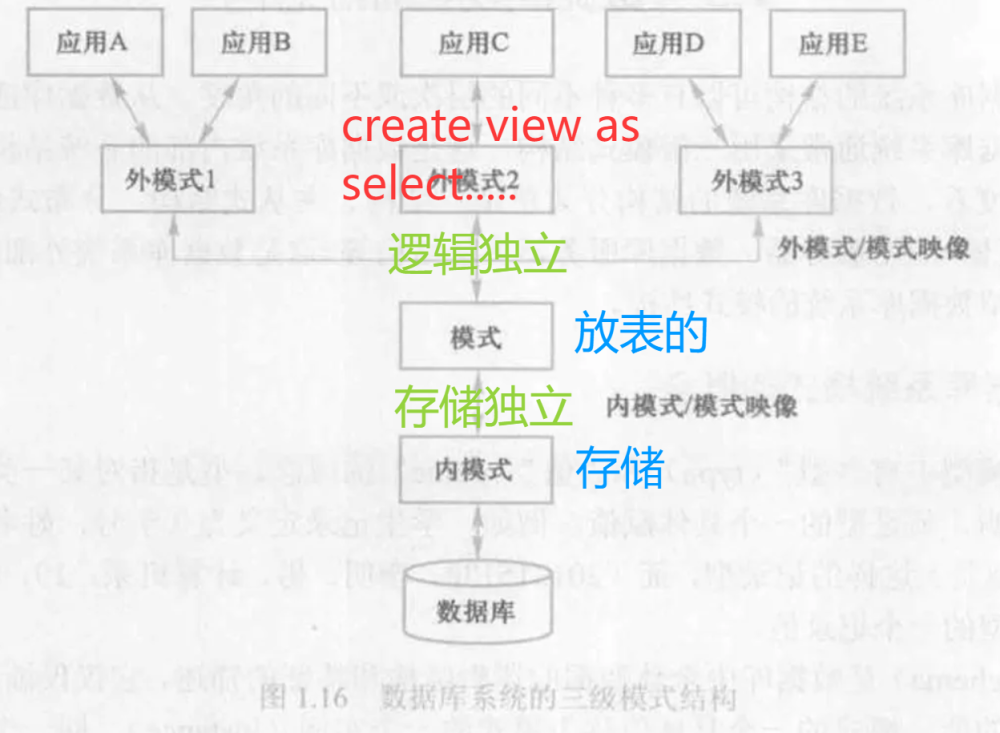
图中标注:内模式对应"存储",模式对应"放表的",外模式对应"逻辑独立";映像体现了 create view as select ... 的位置——逻辑独立、存储独立。1.3 数据分类
| 类型 | 典型代表 | 处理方式 |
|---|---|---|
| 结构化 | MySQL、Oracle、关系表 | 传统 SQL 数据库 |
| 半结构化 | JSON、XML | 可用 Hive JSON SerDe、Spark 解析 |
| 非结构化 | 视频、图片 | YOLO 等模型识别 → 输出 JSON/CSV → 落入数据库 |
第二章 Hadoop 与 HIVE 体系结构
2.1 HDFS(GFS)存储体系
HDFS(Hadoop Distributed File System):源自 Google GFS 论文
核心特性:分块存储、多副本容错、一次写多次读
默认存储路径:/warehousedir/home/xxx.db/表名/(Hive on HDFS 默认行为)
2.2 HIVE 三种工作模式
| 模式 | metastore 位置 | 是否允许多会话 |
|---|---|---|
| Derby | 嵌入式(每个客户端独立) | 否 |
| 本地(Local) | 同节点 MySQL/PG | 单客户端 |
| 远程(Remote) | 远程独立 MySQL | 是 |
2.3 集群环境与启停流程
集群环境:
| 角色 | IP | 用户 |
|---|---|---|
| master | 192.168.5.134 | root / 123123 |
| slave1 | 192.168.5.135 | root / 123123 |
| slave2 | 192.168.5.136 | root / 123123 |
MySQL 安装在 slave2,HIVE 启用本地模式;统一数据库名bigdata2024;本地数据目录/data。
集群启动流程:
- 关闭防火墙(三台虚拟机)
systemctl stop firewalld- 启动 Zookeeper(三台虚拟机)
cd $ZOOKEEPER_HOME
bin/zkServer.sh start
bin/zkServer.sh status # 1 个 leader,2 个 follower- 启动 Hadoop(master)
cd $HADOOP_HOME
sbin/start-all.sh
在三台机器上 jps 查看进程。
- 启动 HIVE(slave2 启动 MySQL,slave1 或 master 启动 HIVE)
# slave2
systemctl start mysqld
# slave1 或 master
cd $HIVE_HOME
bin/hive集群关闭流程(与启动对称):
hive> quit;- master:
sbin/stop-all.sh - 三台机器:
cd $ZOOKEEPER_HOME && bin/zkServer.sh stop shutdown -h now
2.4 HIVE 基础配置与指令
配置分类:
| 类别 | 方式 | 持久性 |
|---|---|---|
| 临时配置 | hive> set key=value; | 仅当前会话 |
| 永久配置 | 修改 hive-site.xml | 持久化 |
常用配置(来自 执行命令集合.txt):
-- 在命令行中显示当前数据库名
set hive.cli.print.current.db=true;
-- 查询结果显示列名
set hive.cli.print.header=true;
-- 启用桶表
set hive.enforce.bucketing=true;
-- 压缩 HIVE 中间结果
set hive.exec.compress.intermediate=true;
-- 让 HIVE 尽量尝试 local 模式查询
set hive.exec.mode.local.auto=true;
-- 动态分区非严格模式
set hive.exec.dynamic.partition.mode=nonstrict;
-- ORC 表事务相关
set hive.support.concurrency=true;
set hive.txn.manager=org.apache.hadoop.hive.ql.lockmgr.DbTxnManager;
set hive.compactor.initiator.on=true;
set hive.compactor.worker.threads=1;最常用的元数据查询指令:
-- 查看表字段
desc 表名;
-- 查看表详细信息(包括存储位置、参数)
desc formatted 表名;
-- 查看建表语句
show create table 表名;关键知识点:
- HIVE metastore 除 Derby 外采取文件夹存储管理——即 HIVE 表对应 HDFS 上的目录,而非文件。
- metastore 存储在 HDFS:
/warehousedir/home/xxx.db/表名(xxx 是数据库名)。
2.5 HDFS Shell 常用命令
# 目录与文件
hadoop fs -mkdir /usr
hadoop fs -touchz /emptyfile          # 创建空白文件
hadoop fs -ls /
hadoop fs -lsr /usr                   # 递归列出

# 大小统计
hadoop fs -du /usr                    # 各文件大小
hadoop fs -dus /usr                   # 汇总大小
hadoop fs -count /usr                 # 文件(夹)数量

# 移动 / 复制 / 删除
hadoop fs -mv /usr/opt/data/student.txt /usr
hadoop fs -cp /usr/opt/data/student.txt /usr
hadoop fs -rm /usr                    # 删除文件/空目录
hadoop fs -rm -r /dir                 # 递归删除

# 上传 / 下载 / 查看
hadoop fs -put /local/student.txt /hdfs/data   # 本地 → HDFS(本地原文件保留)
hadoop fs -get /hdfs/student.txt /local/data   # HDFS → 本地
hadoop fs -cat /student.txt
hadoop fs -text /student.txt

# 权限
hadoop fs -chmod 777 /emptyfile

# 思考:-put 后本地文件是否还有?-mv 呢?-cp 呢?
# -put:本地保留;-mv:本地删除;-cp:本地保留(HDFS 内复制)
第二篇 HIVE 数据管理
第三章 HIVE 数据类型与表创建
3.1 数据库管理
创建/查看/删除:
-- 创建(指定存储位置)
create database owndb;
create database owndb location '/opt';

-- 查看
describe database owndb;
describe database extended owndb;
set hive.cli.print.current.db=true;   -- 在提示符显示当前 DB

-- 删除
drop database owndb;
drop database if exists owndb;
drop database if exists owndb cascade;   -- 级联删除库内所有表

-- 使用
use owndb;
show databases;
show databases in owndb;默认存储路径:/user/hive/warehouse/xxx.db/,通过location指定后自定义。
3.2 表的创建与存储位置
创建基本表(资料 1 HIVE指令实际操练1.txt、2 表的创建与数据装载操作.txt):
create table customers(customerid int, firstname string, lastname string)
comment 'description of the table'
tblproperties('creator'='me', 'create-at'='2020-11-27 10:00')
location '/warehouse/home/customer'
stored as orcfile;

-- 仅复制表结构(不复制数据)
create table if not exists customer2 like owndb.customer;查看表信息:
desc customer;
desc extended customer;
desc formatted customer;
desc owndb.customer.lastname;     -- 查看某字段元数据
3.3 数据导入方式
create table 默认存储位置:HDFS:/warehousedir/home/xxxx.db/表名(Directory)。
三种数据导入方式:
| 方式 | 命令示例 | HDFS 实际文件 |
|---|---|---|
| INSERT 语句 | insert into ... select ... | Directory/000000_0 |
| HDFS put | hadoop fs -put 本地文件 Directory | 直接落入指定目录 |
| LOAD DATA | load data local inpath '/data/st1.txt' into table student; | Directory/xxx文件名 |
Q1(Lesson 4):
create table xxx location对整个命名有什么要求?
- A:location 最好与默认文件管理体系一致,精确到表名级别;若含约束,location 必须放在最后一行。
create table stu_test(sid int, sname string, sage int, addr string)
location '/testdb';
-- 结果:发现并没有 xxx.db/表名 这层目录,因为 location 是人为规定的。
load data 的两种形式:
load data local inpath '/data/st1.txt' overwrite into table student;
-- 本地文件保留,不会被删除

load data inpath '/cloud/path' overwrite into table student;
-- 加载后会删除云端路径下的文件(HDFS 内移动)
3.4 基本数据类型与字段约束
-- 行/字段分隔符
row format delimited
fields terminated by ','         -- 字段分隔符
lines terminated by '\n'         -- 行分隔符
stored as textfile;              -- 存储格式

-- 首位字段字符串机制
create table stu_test(sid string, sname string, sage int, addr string)
row delimited fields terminated by ',' lines terminated by '\n' store as textfile;
3.5 复杂数据类型
3.5.1 Array(数组)
create table student1(sid int, sname string, grade array<float>)
row format delimited
fields terminated by ','
collection items terminated by '#'
lines terminated by '\n';
示例数据 student1.txt:
1,zhangsan,80#90.5#35
2,lisi,90# #88
3,wangwu,87#87
4,mary, #60#
5,tom,60# #
6,jemy,78#
查询 sid=101 学生的第二个成绩(数组下标从 0 开始):
select grade[1] as second_grade
from student1
where sid = 101;解析规则(# 之间的空值解析为 NULL):
| sid | sname | grade(数组) | 说明 | |
|---|---|---|---|---|
| 1 | zhangsan | [80.0, 90.5, 35.0] | 3 个有效浮点数 | |
| 2 | lisi | [90.0, NULL, 88.0] | 中间 # 之间为空 → NULL | |
| 3 | wangwu | [87.0, 87.0] | 2 个有效浮点数 | |
| 4 | mary | [NULL, 60.0, NULL] | 首尾 # 为空 → NULL | |
| 5 | tom | [60.0, NULL, NULL] | 后两个 # 为空 → NULL | 数据仓库 |
| 6 | jemy | [78.0] | 单个元素,结尾 # 忽略 |
装载:
load data local inpath '/opt/data/student1.txt' into table student1;3.5.2 Map(键值对)
create table student2(sid int, sname string, grade map<string, float>)
row format delimited
fields terminated by ','
collection items terminated by '#'
map keys terminated by ':'
lines terminated by '\n';
示例数据 student2.txt:
1,zhangsan,语文:80#数学:90.5#英语:35
2,lisi,语文:90#数学:95#英语:88
3,wangwu,语文:87#数学:87#英语:56
查询 sid=101 学生的数学成绩:
select grade['数学'] as math_score
from student3
where sid = 101;示例数据:
101,张三,数学:90.5#语文:88.0#英语:92.3
102,李四,数学:85.0#语文:90.2#英语:89.7注意:若将 collection items terminated by '#' 删掉,则 Map 集合分割不存在,Map 只能有一个键值对。装载:
load data local inpath '/data/student2.txt' into table student2;3.5.3 Struct(结构体)
create table student4(sid int, info struct<name:string, age:int, sex:string>)
row format delimited
fields terminated by ','
collection items terminated by '#'
lines terminated by '\n';
示例数据 student4.txt:
1,name:zhangsan#age:19#sex:Female
2,name:lisi#age:20#sex:male注意:Struct 不必写 map keys terminated by(教材中的写法是教学示意,标准 Struct 写法见上方)。装载:
load data local inpath '/opt/data/student4.txt' into table student4;3.5.4 Array / Map / Struct 嵌套
Array 嵌套 Map(需要 JSON SerDe,普通 delimited 无法实现):
create table student3(sid int, sname string, grade array<map<string,float>>)
row format serde 'org.apache.hive.hcatalog.data.JsonSerDe';

load data local inpath '/opt/data/student3.txt' into table student3;
JSON 数据格式 student3.txt:
{"sid":1,"sname":"zhangsan","grade":{"语文":80,"数学":90.5,"英语":35}}
{"sid":2,"sname":"lisi","grade":{"语文":80,"数学":90.5,"英语":35}}
{"sid":3,"sname":"wangwu","grade":{"语文":80,"数学":90.5,"英语":35}}
Map 嵌套 Array——同样无法实现。
总结:
Array、Map、Struct 不能嵌套使用(标准 delimited 模式下)
Array、Struct 属于
collection itemsMap 若要实现多组数据并发,隐含包括了 collection items
想做嵌套 → 用 JSON SerDe 或 ORC 复杂类型
3.6 表的复制
| 方式 | 命令 | 复制结构 | 复制数据 |
|---|---|---|---|
| 深拷贝 | create table student3_1_copy as select * from student3_1; | ✔ | ✔ |
| 浅拷贝 | create table student3_2_copy like student3_1; | ✔ | ✘ |
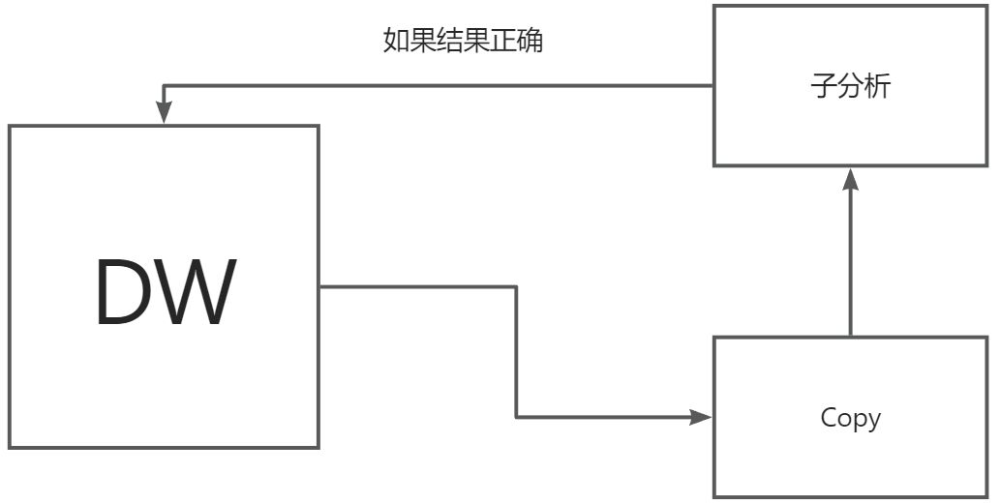
图中数据仓库(DW)将数据复制到子分析模块,"如果结果正确"——深拷贝是数据也一并复制;浅拷贝仅复制表结构。
第四章 HIVE 存储模式
4.1 内部表与外部表
内部表 vs 外部表核心差异:
| 维度 | 内部表(Managed Table) | 外部表(External Table) |
|---|---|---|
| 创建关键字 | create table ... | create external table ... |
| DROP 表行为 | 数据连同元数据一起删除 | 仅删除元数据,location 数据保留 |
| 适用场景 | 中间表、临时计算结果 | 共享数据源、防止误删 |
外部表创建示例:
create external table student_cp(sid int, sname string)
row format delimited fields terminated by ','
location "/tmpdb/student_cp";
DROP 外部表 → 位置 location 仍存在,仅引用切断;当下次仍有同名表(结构相同)时,仍会继续读取里面的数据。
原理:仅切断元数据对 location 的引用,存储位置仍存在。
查看表的位置:
desc formatted tableName;
show create table test_table;
4.2 分区表
4.2.1 分区表的概念
分区表将数据按某个字段值分散到不同 HDFS 子目录,便于剪裁扫描。
常见误解:分区是数据行的字段?错——分区字段是伪列,不参与业务字段存储,但出现在目录名里。
4.2.2 分区表创建与数据导入
静态分区:
create table part_table(sid int, sname string, sage int)
partitioned by(addr string)
row format delimited fields terminated by ',';

load data local inpath '/home/student100'
into table part_table
partition(addr='guangxi'); -- 字符串,addr 必须写清楚,严格管控装载后目录结构:
/warehousedir/home/exam.db/part_table/addr=guangxi/student100原数据未发生变化,分区字段是附加在路径上的伪列。
重复装载:存储位置 addr=xxx 不变,但子文件会多出 student100_copy_1。
分区的增删:
alter table part_table drop partition(addr='guangxi');   -- 删除该分区的子文件
alter table part_table add partition(addr='guangxi');    -- 新增分区
alter table part_table add partition(sage=20, addr='jiangsu'); -- 多分区需指定明确字段注意:show create table part_table;的输出 不能用于新表的创建——它把partitioned by当字符串,不带分区值,无法直接复用。
4.2.3 多分区字段
create table part_table2(sid int, sname string)
partitioned by(sage int, addr string)
row format delimited fields terminated by ',';

load data local inpath '/home/student100'
into table part_table2
partition(sage=20, addr='guangxi');注意:alter table part_table add partition(sage=20, addr='jiangsu'); 需要同时指定两个明确分区的字段。4.2.4 分区的常见问题
| 问题 | 答案 |
|---|---|
无分区表能否 add partition?新增分区字段是已有还是新增? | 不能;分区字段必须是建表时 partitioned by 中声明的伪列 |
已分区的表能否 add partition 新字段? | 不能直接 add 新分区字段;只能新增已有分区字段的值 |
| 非分区表能否变成(alter 成)分区表? | 不能 |
alter table ... add 操作本质是什么? | 虽然语法像 DDL 的 schema 操作,本质是对元数据的修改 + HDFS 目录的创建 |
错误示范:
-- ❌ 非分区表不能 add 分区
create table student00(sid int, sname string);
alter table student00 add partition (gender string);   -- 报错

-- ❌ 这样也无法 load data
create table student00(sid int, sname string) partitioned by(data string);
load data local inpath '/data/x' into table student00;   -- 必须指定分区值

-- ✔ 正确
alter table student00 add partition (data = '20251011');
4.2.5 静态分区 vs 动态分区
| 维度 | 静态分区 | 动态分区 |
|---|---|---|
| Schema | 相同 | 相同 |
| 分区值指定 | 装载时手动 partition(addr='xxx') | 由 SELECT 子句字段决定 |
| 数据控制精度 | 精准(可配合 where 过滤) | 宽松(依赖源数据) |
| 适用场景 | 不干净数据、需要精准把控 | 大量分区批量写入 |
动态分区装载(先创建含 partitioned by 的表,再 insert):
create table student3(sid int, sname string, grade map<string,float>)
partitioned by(addr string)
row format delimited
fields terminated by ',';

-- 静态 insert 也可指定具体分区
insert into table student3
partition (addr="anhui")
select * from ...;
4.2.6 经典实操:ah16 学生体检数据
重要:ah16 是贯穿多个 Lesson 的核心实操表,按要求不删除。
普通表 ah16(资料:学生体检数据普通表和分区表导入.txt、3 静态分区表的管理.txt):
create table ah16(
  sname string, sex int, minzu string, sge int, college string,
  major string, height int, weight int,
  breathlen float, breathweight int, physcore int,
  bloodtype string
)
row format delimited
fields terminated by ','
lines terminated by '\n'
stored as textfile;

load data local inpath '/data/16-1.csv' into table ah16;
-- Loading data to table bigdata20.ah16
ah16 的分区表 ah16_part(按血型分区):
create table ah16_part(
  sname string, sex int, minzu string, sge int, college string,
  major string, height int, weight int,
  breathlen float, breathweight int, physcore int
)
partitioned by (bloodtype string)
row format delimited
fields terminated by ','
lines terminated by '\n'
stored as textfile;

set mapreduce.job.reduces=4;

-- 按 bloodtype 分区装载
insert into ah16_part partition (bloodtype='A')
select sname, sex, minzu, sge, college, major, height, weight,
       breathlen, breathweight, physcore
from ah16 where bloodtype='A';

insert into ah16_part partition (bloodtype='B')
select sname, sex, minzu, sge, college, major, height, weight,
       breathlen, breathweight, physcore
from ah16 where bloodtype='B';

insert into ah16_part partition (bloodtype='AB')
select sname, sex, minzu, sge, college, major, height, weight,
       breathlen, breathweight, physcore
from ah16 where bloodtype='AB';

insert into ah16_part partition (bloodtype='O')
select sname, sex, minzu, sge, college, major, height, weight,
       breathlen, breathweight, physcore
from ah16 where bloodtype='O';

select count(*) from ah16_part;
4.3 桶表(Bucket Table)
4.3.1 桶表概念
- 桶:在表的数据存储层面,按某字段哈希分散到若干文件
- 与分区的区别:分区按值目录切分;桶按哈希文件切分
桶表三大问题(Lesson 9):
- 对应的 schema 创建方法
- 怎样将外部数据(CSV、跨 DB 表、
insert插入若干数据)导入到创建的表中 select *与 HDFS 文件查看指令 对应的数据
4.3.2 桶表创建(ah16 桶表实操)
跨 DB 引用 ah16:
-- ah16 位于 owndb;当前在 bigdata24 库
-- 跨库语法
insert into table bucket_ah16
select * from owndb.ah16;桶表创建:
set hive.enforce.bucketing=true;
set mapreduce.job.reduces=4;

create table bucket_ah16(
  sname string, sex int, minzu string, sge int, college string,
  major string, height int, weight int,
  breathlen float, breathweight int, physcore int,
  bloodtype string
)
clustered by(sge) sorted by (sname desc) into 5 buckets
row format delimited
fields terminated by ',';

-- 跨 DB 装载
insert into table bucket_ah16
select * from owndb.ah16;

-- 分桶采样(Tablesample)
select * from bucket_ah16 tablesample(bucket 1 out of 5 on sge);

-- 查看建表语句(用于参考)
show create table bucket_ah16;
4.3.3 桶表的两个关键陷阱
buck.txt 数据:
10,name10
1,name1
9,name9
3,name3
2,name2
8,name8
4,name4
12,name12
5,name5
15,name15
14,name14
38,name8
7,name7
11,name11
陷阱 1:使用 load data local 装载到桶表(4 桶),会形成四个桶,但 不会形成分区目录。
create table buck_table(sid int, sname string)
clustered by(sid) sorted by(sname desc) into 4 buckets
row format delimited fields terminated by ',';

load data local inpath '/data/buck.txt' overwrite into buck_table;
select * from buck_table;                     -- 看不到分桶痕迹
hadoop fs -ls /warehousedir/home/bigdata24.db/buck_table   -- 没有分区目录
陷阱 2:sorted by + load data 不会按姓名排序;只有通过 INSERT 语句插入数据时,每个桶内的数据才会按 sname 排序。
关键:仅定义sorted by+load data操作不会按姓名排序;只有通过INSERT语句插入数据时,每个桶内的数据才会按sname排序。
对比:load data 与 insert into 的差异:
| 方式 | HDFS 是否分桶 | 文件命名 | Tablesample 行为 |
|---|---|---|---|
load data ... into buck_table | 不形成分桶 | 原始文件名 | 仅逻辑分桶,标号从 1 开始 |
insert into buck_table select * from ... | 形成分桶 | 00000_0(标号从 0 开始) | 物理分桶可采样 |
-- 用 insert 触发真正的分桶
insert into table buck_table select * from bigdata241.buck;

-- 采样(4 桶)
select * from buck_table tablesample(bucket 1 out of 4 on sid);
4.3.4 桶表的完整操作流程
set hive.enforce.bucketing=true;
set mapreduce.job.reduces=4;

-- 第一步:创建桶表
create table bucktable(sid int, sname string)
clustered by(sid) into 4 buckets
row format delimited fields terminated by ',' lines terminated by '\n';

create table bucktable2(sid int, sname string)
clustered by(sid) sorted by(sid desc) into 4 buckets
row format delimited fields terminated by ',' lines terminated by '\n';

-- 第三步:load data(不会触发分桶)
load data local inpath '/data/buck.txt' overwrite into table bucktable;
select * from bucktable;
hadoop fs -ls /datawarehouse/home/;

-- 第四步:建临时表(用于 insert 触发分桶)
create table tmptable(sid int, sname string)
row format delimited fields terminated by ',' lines terminated by '\n';

-- 第五步:load data 进临时表
load data local inpath '/data/buck.txt' overwrite into table tmptable;

-- 第六步:通过 insert 触发分桶
insert into bucktable select * from tmptable;
insert into bucktable2 select * from tmptable;

-- 第七步:查看桶内容
hadoop fs -cat /warehouse/home/owndb.db/bucktable2/000002_0
select * from bucktable2 tablesample(bucket 3 out of 4 on sid);
select * from bucktable  tablesample(bucket 3 out of 4 on sid);
4.4 四种表类型对比
| 类型 | 数据管理方式 | 关键语句 |
|---|---|---|
| 内部表(Table) | 数据与表结构绑定,drop 时级联删除 | create table t(...) |
| 外部表(External Table) | 数据独立于表,drop 时仅删除元数据 | create external table t(...) location '...' |
| 分区表(Partitioned Table) | 按分区字段值目录切分 | partitioned by(field type) |
| 桶表(Bucket Table) | 按哈希分散到固定数量文件 | clustered by(x) into n buckets |
核心问题(Lesson 8 Review):四张表的数据管理方式有什么不同?
内部表 ↔ 外部表:删除时是否级联处理存储位置
分区表:按字段值目录切分(便于剪裁)
桶表:按哈希文件切分(便于采样与高效 JOIN)
第三篇 HQL 数据操作
第五章 数据查询与连接
5.1 数据导出方式
导出到 HDFS:
insert overwrite directory '/hdfs_path'
row format delimited
fields terminated by '#'
select * from xxx;取回本地:
hadoop fs -get /hdfs_path 本地路径导出到基本表(实表):
create table xxx as select ... from ...;导出到视图(虚表):
create view xx as select ... from ...;
select * from xx;   -- 触发 MR
清理 HDFS 目录:
hadoop fs -rm -r /myin # 里头有东西也能删除5.2 JOIN 操作详解
实验表(来自 5 hive连接的案例设计.txt):
create table student100(sno int, sname string, sage int, saddr string)
row format delimited fields terminated by ',' lines terminated by '\n';

create table course100(cno int, cname string, ccredit int)
row format delimited fields terminated by ',' lines terminated by '\n';

create table SC100(sno int, cno int, grade int)
row format delimited fields terminated by ',' lines terminated by '\n';实验数据:
-- student100.txt
1,aa,17,anhui
2,bb,38,henan
3,cc,23,jiangsu
4,dd,56,beijing
5,ee,22,jiangsu
6,ff,23,shanghai
7,gg,24,fujian
8,hh,43,hubei
9,jj,25,jiangxi
10,kk,20,guangdong

-- course100.txt
1,java,3
2,c++,2
3,dephi,3
4,vc++,3
5,python,2
6,spark,2
7,hive,1

-- SC100.txt
1,2,98
2,1,90
5,4,67
10,7,56
8,6,78
5,12,78
6,15,76
20,6,89
30,5,68
5,6,
6,3,
5.2.1 五种连接方式总览
| 连接方式 | 关键字 | 本质 |
|---|---|---|
| 自然连接 | JOIN | 仅保留两表都有匹配的记录 |
| 左外连接 | LEFT JOIN | 以左表为主,右表无匹配补 NULL |
| 右外连接 | RIGHT JOIN | 以右表为主,左表无匹配补 NULL |
| 全外连接 | FULL OUTER JOIN | 左右并集,无匹配补 NULL |
| 左半连接 | LEFT SEMI JOIN | 本质是嵌套查询,只输出左表字段 |
笛卡尔连接:from A, B(不带on)——"最废物的连接",行数 = |A| × |B|,不推荐。
5.2.2 笛卡尔连接(最废物)
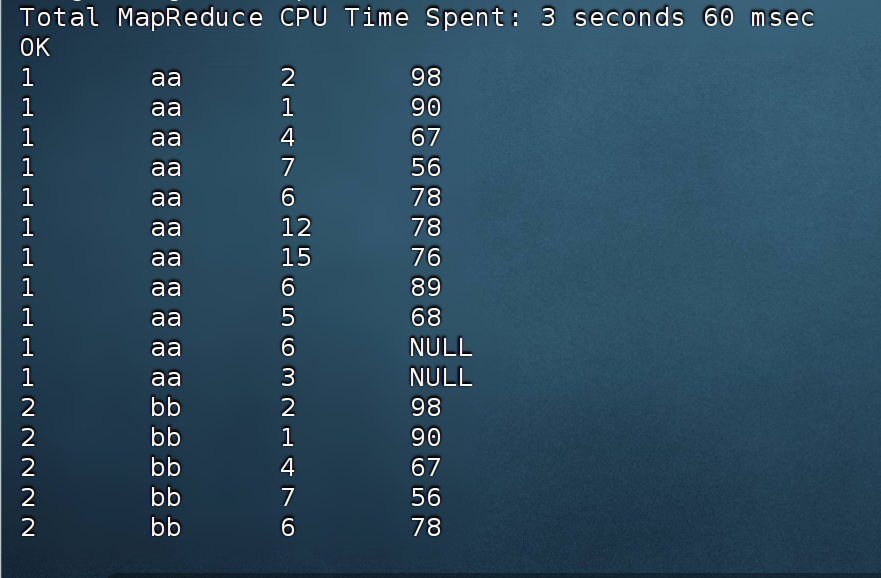
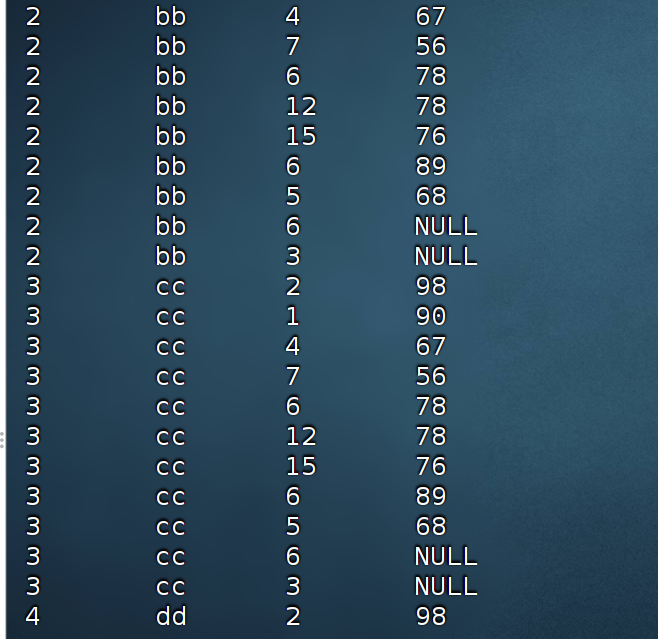
select student100.sno, sname, cno, grade
from student100, SC100;结果展示(按 sno 升序,共 100 行 = 10 × 10):
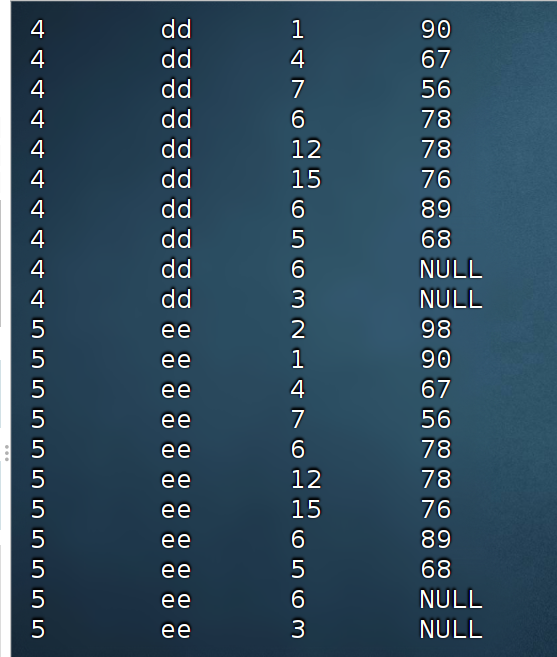
5.2.3 自然连接(JOIN)
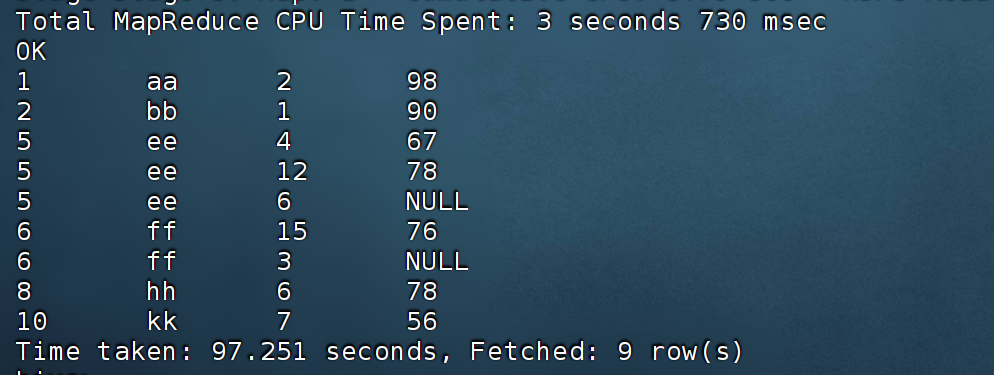
select student100.sno, sname, cno, grade
from student100 join SC100 on student100.sno=SC100.sno;
含义:学生必须存在 student100 里,且选了课(但不必有有效成绩,NULL 也会保留)。
结果(9 行):
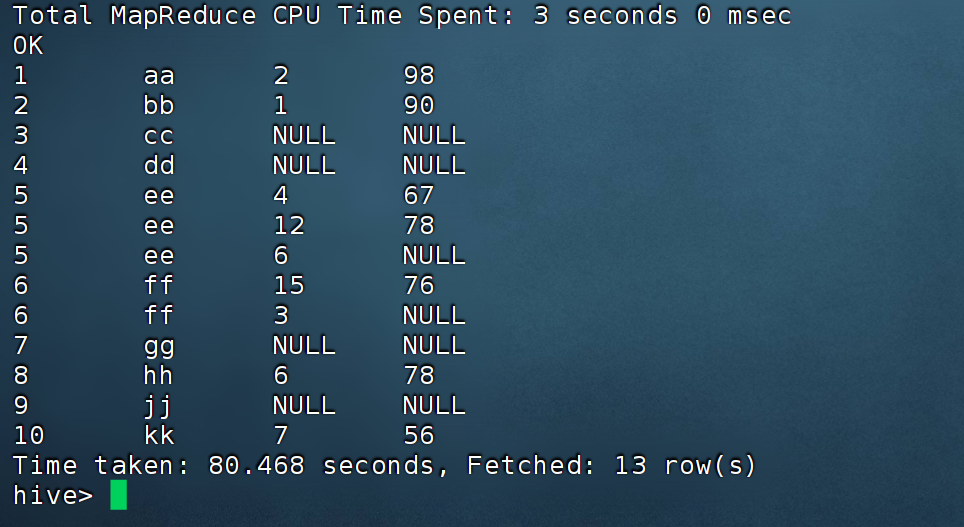
5.2.4 左外连接(LEFT JOIN)
select student100.sno, sname, cno, grade
from student100 left join SC100 on student100.sno=SC100.sno;
含义:以 student100 为主出发,看 SC100 中有谁和它等值,返回左边的全部内容(无匹配则右字段补 NULL)。
结果(13 行):
5.2.5 右外连接(RIGHT JOIN)
select student100.sno, sname, cno, grade
from student100 right join SC100 on student100.sno=SC100.sno;
含义:以 SC100 为主出发,看 student100 中有谁和它等值,返回右边的全部内容(左表无匹配补 NULL)。
结果(11 行):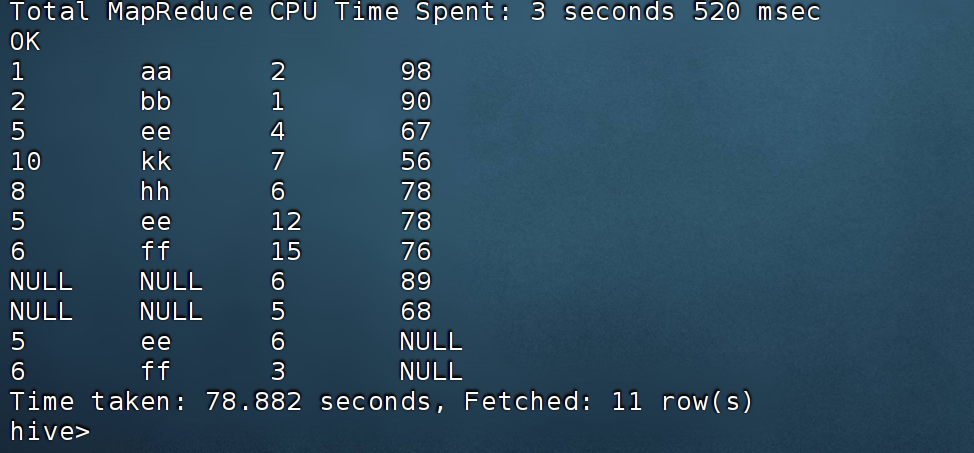
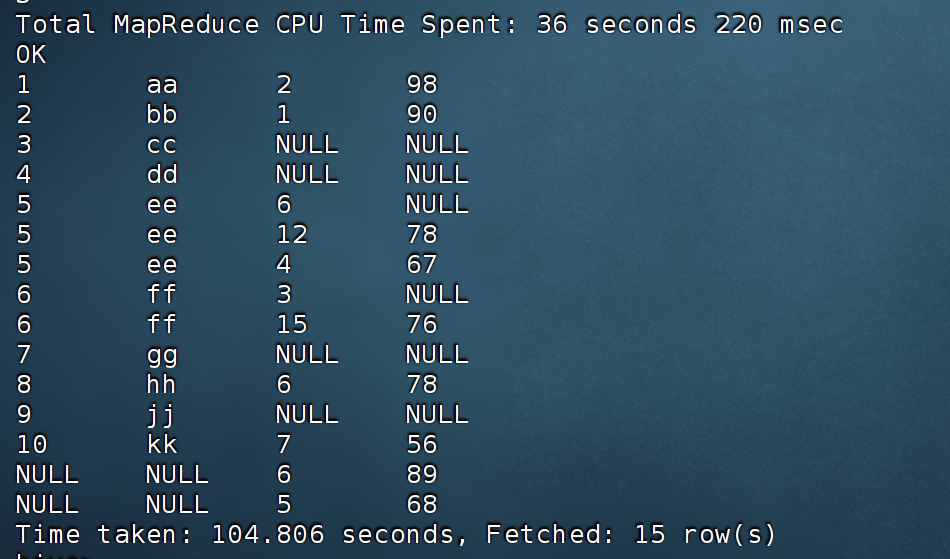
5.2.6 全外连接(FULL OUTER JOIN)
select student100.sno, sname, cno, grade
from student100 full outer join SC100 on student100.sno=SC100.sno;含义:同时执行 LEFT JOIN 和 RIGHT JOIN(已经包含了 JOIN NOT NULL & NOT NULL 的情况)。结果(15 行):
5.2.7 左半连接(LEFT SEMI JOIN)
select student100.sno, sname, sage, saddr
from student100 left semi join SC100
on (student100.sno = SC100.sno);核心思想:"检查左表的每一行是否能在右表中找到匹配项,如果能,就保留左表的这一行;否则,就丢弃它。"
LEFT SEMI JOIN 的关键特性:
- 本质是嵌套查询,不是真正的 JOIN
- 只输出左表字段,右表字段不可引用
- HIVE 不支持多层 LEFT SEMI JOIN 嵌套(仅一次嵌套)
5.2.8 多层嵌套的两种实现方式
场景:选课人数 > 2 的有效选课学生名单
方式一:临时表(推荐)
-- 步骤 1:建立中间表(统计每门课的选课人数)
create table tempsc100 as
select cno, count(*) as cnt from SC100 group by cno;

-- 查看 tempsc100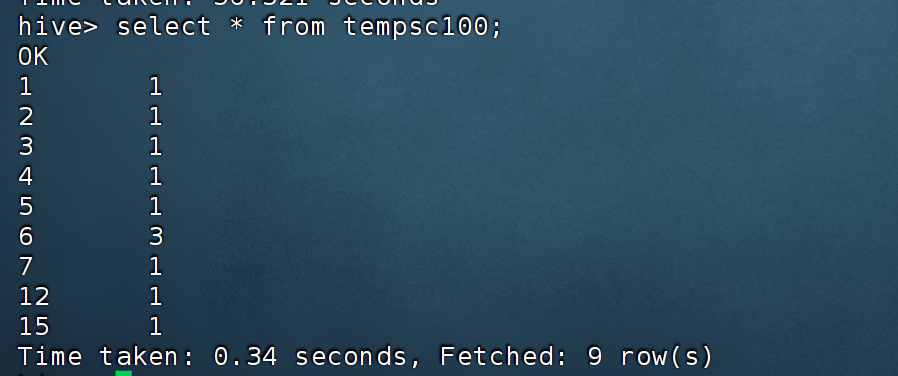
-- 步骤 2:选出选课人数 > 2 的课程对应的学生
create table tmpst100 as
select SC100.sno from SC100 join tempsc100
  on SC100.cno = tempsc100.cno
where cnt > 2;

-- 步骤 3:LEFT SEMI JOIN 锁定最终学生名单
select sno, sname
from student100 left semi join tmpst100
on student100.sno = tmpst100.sno;结论:HIVE 不支持多层嵌套,只支持 LEFT SEMI JOIN 一次嵌套。因此只能通过中间表的方式实现多层嵌套。
方式二:子查询(不需要创建中间表)
select *
from student100
inner join
(
    select *
    from tempsc100
    join sc100
    on tempsc100.cno = sc100.cno
    where cnt > 2
) a
on student100.sno = a.sno;注意:嵌套子查询中两个 SC100 都有cno字段,会出现二义性,必须用别名a隔离。
5.3 ah16 血型统计复习
重要:ah16 实操不删除。
【复习 ah16】一次性统计出所有血型的指令 Group by:
select bloodtype, count(*) as cnt
from owndb.ah16
group by bloodtype;
第六章 函数与视图
6.1 条件函数:if / case when
if 函数(二分类):
if(condition, TrueValue, DefaultValue)case when(多分支):
case <field>
  when 'value1' then 'result1'
  when 'value2' then 'result2'
  ...
  else 'default_result'
end as alias经典案例(tb_case 表):
悟空   A   男
娜娜   A   男
宋宋   B   男
凤姐   A   女
热巴   B   女
慧慧 B 女目标结果:
| dname | 男 | 女 |
|---|---|---|
| A | 2 | 1 |
| B | 1 | 2 |
方法一:行转列后再 sum:
-- 第一步:分组计数(4 行)
select dname, gender, count(*) as cnt
from tb_case
group by dname, gender;

-- 第二步:行转列
select
  dname,
  count(*) as count_numbe,
  sum(if(gender == '男', 1, 0)) as M,
  sum(if(gender == '女', 1, 0)) as F
from tb_case
group by dname;
方法二:直接用 case when 行转列:
-- 写法一
select
  dname,
  sum(case gender when '男' then 1 else 0 end) as m,
  sum(case gender when '女' then 1 else 0 end) as f
from tb_case
group by dname;

-- 写法二
select
  dname,
  sum(case when gender == '男' then 1 else 0 end) as m,
  sum(case when gender == '女' then 1 else 0 end) as f
from tb_case
group by dname;附加应用:性别缩写转换
select
  name, dname, gender,
  case gender
    when '男' then 'm'
    when '女' then 'f'
  end
from tb_case;
6.2 聚合函数与分组汇总
sum 的两种写法对比:
| 写法 | 含义 | 是否正确 |
|---|---|---|
sum(jb + jj + tc) | 把三列相加后求和 | ✔ 正确 |
sum(jb, jj, tc) | 把三列作为独立参数求和 | ❌ 错误 |
max vs greatest:
| 函数 | 作用范围 |
|---|---|
max(col) | 返回列中最大的值 |
greatest(col1, col2, col3, ...) | 返回行内多个字段中最大的值 |
经典案例:每位员工收入最高的类型(资料 8. case_when.txt)
-- 表 gz(uid, jb, jj, tc, deptno)
select
  uid,
  greatest(jb, jj, tc) as greatest_sal,
  case
    when jb == greatest(jb, jj, tc) then 'jb'
    when jj == greatest(jb, jj, tc) then 'jj'
    when tc == greatest(jb, jj, tc) then 'tc'
  end as greatest_sal_type
from gz;配套员工-部门关联分析(gz, bm, yg 三表连接):
-- 求每部门总薪资
select
  deptno,
  sum(jb + jj + tc) as sal_sum_dept
from gz
group by deptno;

-- 求每部门不同性别员工薪资总和
select
  deptno, gender,
  sum(jb + jj + tc) as sum_sal_dept_and_gender
from (
    select gz.*, yg.gender
    from yg join gz on yg.uid = gz.uid
) t
group by deptno, gender;
6.3 视图
视图 vs 表:
| 维度 | 视图(虚表) | 表(实表) |
|---|---|---|
| 创建语句 | create view v as select ... | create table t as select ... |
| 是否执行 MR | 不执行 MR | 执行 MR |
| 查询时行为 | select * from 视图 → 自动 MR | select * from table → 不启动 MR |
| 数据存储 | 不存储数据,仅保存定义 | 存储物理数据 |
视图的特点:
create view as select ...不执行 MR
create table as select ...执行 MR
create view as (select ...)保持原来数据的统一,虚实结合,真正的查询对象是实表
实操:
create view viewdb as
select
  dname,
  count(*) as count_numbe,
  sum(if(gender == '男', 1, 0)) as M,
  sum(if(gender == '女', 1, 0)) as F
from tb_case
group by dname;

-- 视图与表的查询对比
select * from tmp_case;       -- 不启动 MR
select * from viewdb;          -- 自动 MR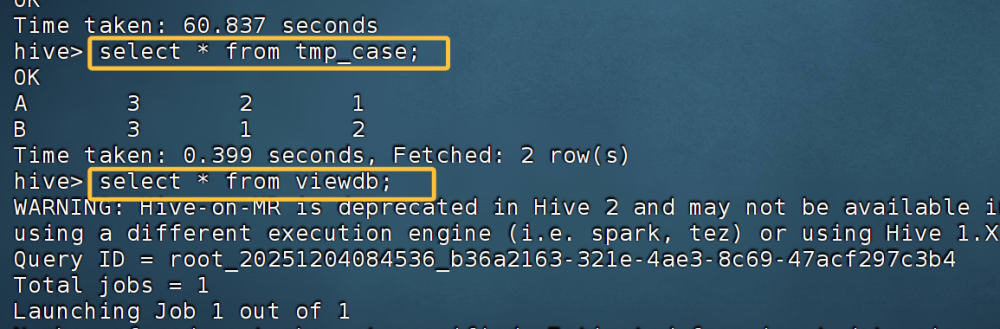
6.4 查询输出方式总结
| 输出方式 | 命令 | 存储位置 |
|---|---|---|
| 临时输出 | select * from ... | 控制台 |
| 输出到 HDFS | insert overwrite directory '目录' row format delimited fields terminated by '#' select ... | HDFS 目录 |
| HDFS → 本地 | hadoop fs -get HDFS目录 本地目录 | 本地 |
| 输出到基本表 | create table xxx as select ... | 实表 |
| 输出到视图 | create view xx as select ...; select * from xxview; | 虚表(启动 MR) |
| 临时表查询(不创建表) | with t as (select ...) | 内存中的临时结果集 |
6.5 常用内置函数清单
字符串函数:
| 函数 | 作用 | 示例 |
|---|---|---|
length(s) | 字符数 | length('hello world') → 11 |
concat(a, b, ...) | 拼接 | concat('hello', 'world') |
trim(s) | 只去首尾空格(注意:不是去全部) | trim(' hello ') |
lpad(s, n, c) | 左填充至 n 位 | lpad('abcd', 10, '*') |
rpad(s, n, c) | 右填充至 n 位 | rpad('abcd', 10, '*') |
lower(s) | 转小写 | lower('Hello WORLD!') |
upper(s) | 转大写 | upper('Hello WORLD!') |
substr(s, start) | 从 start 开始截到末尾(1-based) | substr('hello world', 5) → ' world' |
substr(s, start, len) | 截取 len 个字符 | substr('hello world', 5, 3) → ' wo' |
instr(s, sub) | 子串位置 | instr('hello', 'll') → 3 |
数值函数:
| 函数 | 作用 | 示例 |
|---|---|---|
round(x, d) | 四舍五入(d 可为负数) | round(45.836, -1) → 50.0;round(45.836, -2) → 0.0;round(95.836, -2) → 100.0 |
ceil(x) | 向上取整 | ceil(45.926) |
floor(x) | 向下取整 | floor(45.926) |
收集/转换函数:
| 函数 | 作用 | 示例 |
|---|---|---|
size(map(1,'yom',2,'ff')) | 返回集合大小 | 2 |
cast(x as type) | 类型转换 | cast('2019-11-21' as date) |
日期函数:
| 函数 | 作用 | 示例 |
|---|---|---|
to_date(s) | 转日期 | to_date('2019-11-28 11:23:45') |
year(s) / month(s) / day(s) | 取年/月/日 | year('2019-11-28') → 2019 |
weekofyear(s) | 周数 | |
datediff(d1, d2) | 日期差(天) | datediff('2019-11-29','2014-11-12') |
date_add(d, n) | 加 n 天(n 可负) | date_add('2019-12-2', 2) |
date_sub(d, n) | 减 n 天 | |
from_unixtime(unix_timestamp(s, fmt), fmt) | 时间戳格式化 | from_unixtime(unix_timestamp('20200101','yyyyMMdd'),'yyyy-MM-dd') → 2020-01-01 |
current_date | 当前日期 |
条件函数:
| 函数 | 作用 |
|---|---|
coalesce(a, b, c, ...) | 从左到右返回第一个不为 NULL 的值 |
case ... when ... then ... end | 多分支条件 |
聚合函数:count、sum、min、max、avg
表生成函数:
| 函数 | 作用 |
|---|---|
explode(map) / explode(array) | 行转列 |
查询优化开关(Lesson 12):
set hive.fetch.task.conversion=more;
-- 或
set hive.exec.mode.local.auto=true;
-- 简单 select 不转换为 MR
第四篇 综合实战
第七章 综合案例分析
7.1 肥胖等级数据分析(obesity_level.csv)
建表:
drop table if exists feipang;

create table feipang(
  gender string,
  age int,
  height float,
  fam_his int,
  FAVC int,
  FCVC int,
  NCP int,
  CAEC string,
  SMOKE int,
  CH2O float,
  SCC int,
  FAF int,
  TUE float,
  CALC string,
  MTRANS string,
  fat_level string
)
row format delimited
fields terminated by ','
tblproperties('skip.header.line.count'='1');  -- 跳过 CSV 首行表头

load data local inpath '/home/obesity_level.csv' into table feipang;查询基础统计:
select count(*) as cnt from feipang;
select distinct(fat_level) from feipang group by fat_level;实操题目:
- 查询 fat_level 等级数量及占比:
with TOTAL as (select count(*) as total from feipang)
select distinct(fat_level), round(count(*) / TOTAL.total, 3) as percentage
from feipang
group by fat_level;- 查询 MTRANS 各类样本数:
select distinct(MTRANS), count(*) as cnt_MTRANS
from feipang
group by MTRANS;- 将 CAEC 中 '0' 替换为 'Never'(不增加新字段):
-- 先观察 CAEC 取值
select distinct(CAEC) from feipang;

-- 思路:先建临时表新增 CAEC_1 列,再覆盖回原表
create table feipang_new as
select *, case CAEC when '0' then 'Never' end as CAEC_1
from feipang;
-- 注意观察 CAEC=sometimes/always/frequently 的数据会不会一起
-- 携带到 CAEC_1 的字段中 → CAEC_1 中只含 Never

-- 覆盖原表(必须列出全部列)
insert overwrite table feipang
select
  gender, age, height, fam_his, FAVC, FCVC, NCP,
  CAEC_1,                              -- 替换后的列
  SMOKE, CH2O, SCC, FAF, TUE,
  CALC, MTRANS, fat_level
from feipang_new;- ORC 表事务权限(ORC 表可 update / delete,textfile 不行):
create table feipang_new (stored as ORC)
as
select *, case CAEC when '0' then 'Never' end as CAEC_1
from feipang;
7.2 身份证信息处理
建表:
create table cid_info(id int, cid string)
row format delimited fields terminated by '#';

load data local inpath '/home/cid.txt' into table cid_info;

-- 观察 cid 长度(会有空格,要确定从哪开始计算)
select distinct(length(cid)) from cid_info;
题目 1:截取 cid 的 8 位出生年月日作为 birthday
select cid, substr(cid, 8, 8) as birthday from cid_info;

alter table cid_info add columns(birthday string);

-- 只插一列(不用中间表)——没有 into
insert overwrite table cid_info
select id, cid, substr(cid, 8, 8) as birthday from cid_info;
题目 2:将截取的 birthday 转换为 yyyy-MM-dd 格式
alter table cid_info add columns(birth_date string);

insert overwrite table cid_info
select
  id, cid, birthday,
  from_unixtime(unix_timestamp(substr(cid, 8, 8), 'yyyyMMdd'), 'yyyy-MM-dd') as birth_date
from cid_info;
题目 3:将 birthday 拆分为 year、month、day
alter table cid_info add columns(birth_year int, birth_month int, birth_day int);

insert overwrite table cid_info
select
  id, cid, birthday, birth_date,
  year(birth_date) as birth_year,
  month(birth_date) as birth_month,
  day(birth_date) as birth_day
from cid_info;
题目 4:计算实岁和虚岁
alter table cid_info add columns(age_shi float, age_xu int);

insert overwrite table cid_info
select
  id, cid, birthday, birth_date,
  birth_year, birth_month, birth_day,
  round(datediff(current_date, birth_date) / 365, 1) as age_shi,
  year(current_date) - birth_year as age_xu
from cid_info;
7.3 结婚离婚数据查询综合实训
资料 7 结婚离婚数据查询综合实训.txt
建表(70+ 字段,按季度拆分每省年度数据):
create table marriage(
  province string,
  M07Q1 int, D07Q1 int, M07Q2 int, D07Q2 int,
  M07Q3 int, D07Q3 int, M07Q4 int, D07Q4 int,
  -- ... 省略 M08Q1..M20Q3 共 14 年的所有季度字段
  M20Q1 int, D20Q1 int, M20Q2 int, D20Q2 int, M20Q3 int, D20Q3 int
)
row format delimited
fields terminated by ','
collection items terminated by '-'
map keys terminated by ':'
tblproperties('skip.header.line.count'='2');

load data local inpath '/opt/data/marriageclean.txt' overwrite into table marriage;查询:
set hive.cli.print.header=true;
select province, M07Q1, D07Q1, M07Q2, D07Q2, M07Q3, D07Q3, M07Q4, D07Q4
from marriage limit 10;

select count(*) from marriage;

-- 2007 年各省结婚/离婚季度合计
select province, M07Q1+M07Q2+M07Q3+M07Q4 from marriage;典型分析:07 年结婚数最高的省份
create table Y07MD as
select province, avg(M07Q1+M07Q2+M07Q3+M07Q4) as M07,
       avg(D07Q1+D07Q2+D07Q3+D07Q4) as D07
from marriage
group by province
order by M07;

select max(M07) from Y07MD;     -- 1806787.0
select province from Y07MD where M07 = 1806787.0; -- 山东省多年汇总:
create table allyearM as
select province,
  sum(M07Q1+M07Q2+M07Q3+M07Q4) as M07,
  sum(M08Q1+M08Q2+M08Q3+M08Q4) as M08,
  -- ... 14 年
  sum(M20Q1+M20Q2+M20Q3) as M20
from marriage
group by province
order by M07;

select * from allyearM limit 10;错误示例:select max(M07, M08, M09, M10, M11) from allyearM;❌max不能接受多列参数。
第八章 半结构化数据处理
8.1 JSON 数据处理
JSON 解析的两种方式:
JAR 包方式:自定义 RegexSerDe 解析
get_json_object 函数:函数式字段提取
应用案例:影评库 users.dat / movies.dat / ratings.dat(详见第九章)。
8.2 字符串函数与数据清洗
字符串函数复习(见 §6.5)。
特别注意:
trim 只去首尾空格
length 计算字符数(含空格),如 length(' hello') → 6
concat 拼接时空格会保留,必要时先 trim
第九章 影评综合案例
资料 第11章 影评案例综合应用.txt
9.1 数据说明
| 数据文件 | 格式 | 行数 | 字段 | ||
|---|---|---|---|---|---|
users.dat | 2::M::56::16::70072 | 6040 | UserID BigInt, Gender String, Age Int, Occupation String, Zipcode String | ||
movies.dat | `2::Jumanji (1995)::Adventure | Children's | Fantasy` | 3883 | MovieID BigInt, Title String, Genres String |
ratings.dat | 1::1193::5::978300760 | 1000209 | UserID BigInt, MovieID BigInt, Rating Double, Timestamped String |
问题:HIVE 不支持解析多字节分隔符 '::',必须用 RegexSerDe 或先 shell 清洗成单分隔符。9.2 建表(RegexSerDe)
drop database if exists movie;
create database if not exists movie;
use movie;

-- 用户表
create table t_user(
  userid bigint, sex string, age int, occupation string, zipcode string)
row format serde 'org.apache.hadoop.hive.serde2.RegexSerDe'
with serdeproperties(
  'input.regex'='(.*)::(.*)::(.*)::(.*)::(.*)',
  'output.format.string'='%1$s %2$s %3$s %4$s %5$s')
stored as textfile;

-- 电影表
create table t_movie(
  movieid bigint, moviename string, movietype string)
row format serde 'org.apache.hadoop.hive.serde2.RegexSerDe'
with serdeproperties(
  'input.regex'='(.*)::(.*)::(.*)',
  'output.format.string'='%1$s %2$s %3$s')
stored as textfile;

-- 评分表
create table t_rating(
  userid bigint, movieid bigint, rate double, times string)
row format serde 'org.apache.hadoop.hive.serde2.RegexSerDe'
with serdeproperties(
  'input.regex'='(.*)::(.*)::(.*)::(.*)',
  'output.format.string'='%1$s %2$s %3$s %4$s')
stored as textfile;

-- 装载
load data local inpath '/warehouse/users.dat'  into table t_user;
load data local inpath '/warehouse/movies.dat' into table t_movie;
load data local inpath '/warehouse/ratings.dat' into table t_rating;

select * from t_user limit 5;
select * from t_movie limit 5;
select * from t_rating limit 5;
9.3 十大分析需求
(1) 被评分次数最多的 10 部电影
create table answer2 as
select a.moviename as moviename, count(a.moviename) as total
from t_movie a
join t_rating b on a.movieid = b.movieid
group by a.moviename
order by total desc
limit 10;

select * from answer2;
(2) 男性/女性评分最高的 10 部电影
-- 女性
create table answer3_F as
select 'F' as sex, c.moviename as name,
       avg(a.rate) as avgrate, count(c.moviename) as total
from t_rating a
join t_user b  on a.userid  = b.userid
join t_movie c on a.movieid = c.movieid
where b.sex = 'F'
group by c.moviename
having total >= 50
order by avgrate desc
limit 10;

-- 男性
create table answer3_M as
select 'M' as sex, c.moviename as name,
       avg(a.rate) as avgrate, count(c.moviename) as total
from t_rating a
join t_user b  on a.userid  = b.userid
join t_movie c on a.movieid = c.movieid
where b.sex = 'M'
group by c.moviename
having total >= 50
order by avgrate desc
limit 10;
(3) movieid = 2116 各年龄段平均影评
create table answer4 as
select a.age as age, avg(b.rate) as avgrate
from t_user a
join t_rating b on a.userid = b.userid
where b.movieid = 2116
group by a.age;
(4) 影评最多的女性评分最高的 10 部电影的平均影评分
-- A:最喜欢看电影的女性
select a.userid, count(a.userid) as total
from t_rating a
join t_user b on a.userid = b.userid
where b.sex = 'F'
group by a.userid
order by total desc
limit 1;   -- 假设 userid = 1150

-- B:该女性评分最高的 10 部电影
create table answer5_B as
select a.movieid as movieid, a.rate as rate
from t_rating a
where a.userid = 1150
order by rate desc
limit 10;

-- C:求出 B 中 10 部电影的平均影评分
create table answer5_C as
select b.movieid as movieid, c.moviename as moviename, avg(b.rate) as avgrate
from answer5_B a
join t_rating b on a.movieid = b.movieid
join t_movie  c on b.movieid = c.movieid
group by b.movieid, c.moviename;
(5) 好片(评分 ≥ 4.0)最多的年份中最好看的 10 部电影
-- A:截取年份
create table answer6_A as
select a.movieid as movieid, a.moviename as moviename,
       substr(a.moviename, -5, 4) as years,
       avg(b.rate) as avgrate
from t_movie a
join t_rating b on a.movieid = b.movieid
group by a.movieid, a.moviename;

-- B:好片最多的年份
select years, count(years) as total
from answer6_A a
where avgrate >= 4.0
group by years
order by total desc
limit 1;   -- 假设 = 1998

-- C:该年评分最高的 10 部电影
create table answer6_C as
select a.moviename as name, a.avgrate as rate
from answer6_A a
where a.years = 1998
order by rate desc
limit 10;
(6) 1997 年评分最高的 10 部 Comedy 类电影
-- A:联合电影类型
create table answer7_A as
select b.movieid as id, b.moviename as name,
       b.years as years, b.avgrate as rate, a.movietype as type
from t_movie a
join answer6_A b on a.movieid = b.movieid;

-- B:筛选 + 排序
create table answer7_B as
select t.id as id, t.name as name, t.rate as rate
from answer7_A t
where t.years = 1997 and instr(lcase(t.type), 'comedy') > 0
order by rate desc
limit 10;
(7) 各类型电影中评价最高的 5 部(TopN)
-- A:裂变电影类型
create table answer8_A as
select a.id as id, a.name as name, a.years as years,
       a.rate as rate, tv.type as type
from answer7_A a
lateral view explode(split(a.type, '\\|')) tv as type;

-- B:按类型分组编号
create table answer8_B as
select id, name, years, rate, type,
       row_number() over (distribute by type sort by rate desc) as num
from answer8_A;

-- C:取每组前 5
select a.* from answer8_B a where a.num <= 5;
(8) 各年评分最高的电影类型
-- A:按 (年份, 类型) 分组计算平均评分
create table answer9_A as
select a.years as years, a.type as type, avg(a.rate) as rate
from answer8_A a
group by a.years, a.type
order by rate desc;

-- B:按年份编号
create table answer9_B as
select years, type, rate,
       row_number() over (distribute by years sort by rate) as num
from answer9_A;

-- C:取每年最高类型
select * from answer9_B where num = 1;
(9) 每个地区最高评分的电影名(存入 HDFS)
-- A:三表联合,计算每个 (地区, 电影) 平均评分
create table answer10_A as
select c.movieid, c.moviename, avg(b.rate) as avgrate, a.zipcode
from t_user a
join t_rating b on a.userid  = b.userid
join t_movie  c on b.movieid = c.movieid
group by a.zipcode, c.movieid, c.moviename;

-- B:按地区分组编号
create table answer10_B as
select movieid, moviename, avgrate, zipcode,
       row_number() over (distribute by zipcode sort by avgrate) as num
from answer10_A;

-- C:取 num = 1 的行写入 HDFS
insert overwrite directory '/movie/answer10/'
select t.* from answer10_B t where t.num = 1;

hadoop fs -ls  /movie/answer10/
hadoop fs -cat /movie/answer10/000000_0
第五篇 总复习
第十章 知识体系总结
10.1 表的创建与存储
| 知识点 | 关键点 |
|---|---|
| 数据库存储位置 | 默认 /user/hive/warehouse/xxx.db/,可 location 指定 |
| 表/外部表 location | 写在表级,location 最好精确到表名级,含约束时必须放最后 |
| 表/外部表/分区表/桶表数据装载 | 与表的内容匹配 |
| 分区表/桶表查看内容 | partition 目录查看 vs 桶号文件 00000_0 |
10.2 四种表类型
| 类型 | 关键字 | 数据管理 |
|---|---|---|
| 普通表 | create table | drop 级联删除 |
| 外部表 | create external table ... location | drop 不级联(原理:引用切断,存储位置仍存在) |
| 分区表 | partitioned by | 按字段值目录切分 |
| 桶表 | clustered by ... into n buckets | 按哈希分散到固定数量文件 |
10.3 数据输入与输出方法
输入(数据导入):
| 方法 | 命令 |
|---|---|
| HDFS put | hadoop fs -put 本地文件 Directory |
| LOAD DATA | load data local inpath '/data/st1.txt' into table student; |
| INSERT | insert into ... select ... |
| HDFS cp/mv | hadoop fs -cp /hdfs/path /target 等 |
输出(查询导出):
| 方法 | 命令 |
|---|---|
| 控制台临时输出 | select * from ... |
| 输出到 HDFS | insert overwrite directory '目录' row format delimited fields terminated by '#' select ... |
| 输出到视图 | create view xx as select ... |
| 输出到实表 | create table xx as select ... |
| WITH 临时查询 | with t as (select ...) select * from t |
10.4 HQL 增删改查
- ORC 表开放事务权限后,可执行
update、delete;textfile不行 insert没有问题(任何存储格式)- 查询思路:
distinct、count、group by、order by、limit - 函数应用:
max、min、avg、greatest、if、case when、length、concat、trim、lower、upper、instr、substr等
10.5 笛卡尔连接 / 五种 JOIN 总结
| 连接方式 | 关键字 | 特性 |
|---|---|---|
| 笛卡尔连接 | from A, B(不带 on) | 行数 = |
| 自然连接 | JOIN ... ON | 仅保留匹配 |
| 左外连接 | LEFT JOIN | 左表为主 |
| 右外连接 | RIGHT JOIN | 右表为主 |
| 全外连接 | FULL OUTER JOIN | 左右并集 |
| 左半连接 | LEFT SEMI JOIN | 仅输出左表字段,本质是嵌套查询 |
10.6 静态分区 vs 动态分区
| 维度 | 静态分区 | 动态分区 |
|---|---|---|
| Schema | 相同 | 相同 |
| 数据装载速度 | 较快(直接挂目录) | 较慢(需 MR) |
| 数据控制精度 | 精准(配合 where 过滤不干净数据) | 宽松(依赖源数据) |
| 典型语句 | load data ... partition(addr='xx') | insert ... partition(addr) |
附录:参考资料清单
| 类别 | 文件 |
|---|---|
| 集群与 HDFS | 00 集群启动.txt、0 hdfs shell操作.txt |
| HIVE 基础指令 | 1 HIVE指令实际操练1.txt、2 表的创建与数据装载操作.txt |
| 复杂类型 | 3 三种复杂结构的数据输入操作实践.txt、3 静态分区表的管理.txt |
| 桶表 | 4 桶表的数据装载及分桶显示.txt、4 桶表的数据装载及分桶显示(1).txt |
| JOIN 案例 | 5 hive连接的案例设计.txt |
| 函数与查询 | 6 查询软件实践.txt、8. case_when.txt、8.1 source.txt |
| 综合实训 | 7 结婚离婚数据查询综合实训.txt、第11章 影评案例综合应用.txt、json.txt |
| 实操数据 | ah16(体检数据)、obesity_level.csv、学生体检数据普通表和分区表导入.txt |
| HIVE 配置 | 执行命令集合.txt |
| 教材 PPT | 02 Hadoop与HIve.pptx、03 HIVE的体系结构与安装.pptx、第4-10章 Hive 系列 |
附录:原始笔记 Lesson 索引
| Lesson | 主题 | 详见本文档 |
|---|---|---|
| Lesson 1 | 前沿技术科普 | §1.1 |
| Lesson 2 | 三级模式、数据分类、HIVE 三种部署 | §1.2、§1.3、§2.2 |
| Lesson 3 | 集群启停、HIVE 配置、metastore | §2.3、§2.4、§3.1 |
| Lesson 4 | 数据导入、location 规范、复杂数据类型 | §3.3、§3.4、§3.5 |
| Lesson 5 | 表复制、Array/Map/Struct 嵌套 | §3.6、§3.5.4 |
| Lesson 6 | 外部表、load data、ah16 实操 | §4.1、§4.2.6 |
| Lesson 7 | 静态分区表 | §4.2.1-§4.2.4 |
| Lesson 8 | 动态分区表、桶表、五种 JOIN | §4.2.5、§4.3、§5.2.1 |
| Lesson 9 | 桶表陷阱、数据导出 | §4.3.3、§5.1 |
| Lesson 10 | JOIN 五种连接、LEFT SEMI JOIN | §5.2 |
| Lesson 11 | 视图、case when、聚合函数 | §6.1、§6.3 |
| Lesson 12 | 查询输出、肥胖数据实战 | §6.4、§7.1 |
| Lesson 13 | ORC 表、CAEC 字段替换 | §7.1 |
| Lesson 14 | 身份证信息处理 | §7.2 |
| Lesson 15 | JSON 处理 | §8.1、§9 |
| Lesson 16 | 字符串函数、知识体系总结 | §6.5、第十章 |